5 Best medical alert systems for seniors in 2026 that actually perform
Discover the 5 best medical alert systems for the elderly in 2026. Compare reliability, response times, and usability to choose the right device for your loved one.
Most families rely on a system that actually stays reliable when a senior moves around the house or steps outside. The top picks in this 2026 roundups focus on real-world performance, not glossy features, with clear attention to coverage areas, response times, and caregiver access. The list below aligns each option to concrete use cases: in-home versus mobile, fall detection accuracy, and how families monitor events in real time. Lively Mobile features prominently for active seniors, while other brands fill gaps in home coverage or caregiver visibility, ensuring you can pair two options for a layered safety plan.
Reliability matters now more than ever as aging-in-place grows. A 2025 consumer survey noted that families rate response time and ease of use as the top two decision drivers, ahead of device aesthetics or app polish. This piece zeroes in on setup practicality, how GPS and fall detection influence false positives, and what real-world service coverage looks like, so you can pick with confidence.
Best medical alert systems for the elderly in 2026: how reliability and response times differ in real deployments
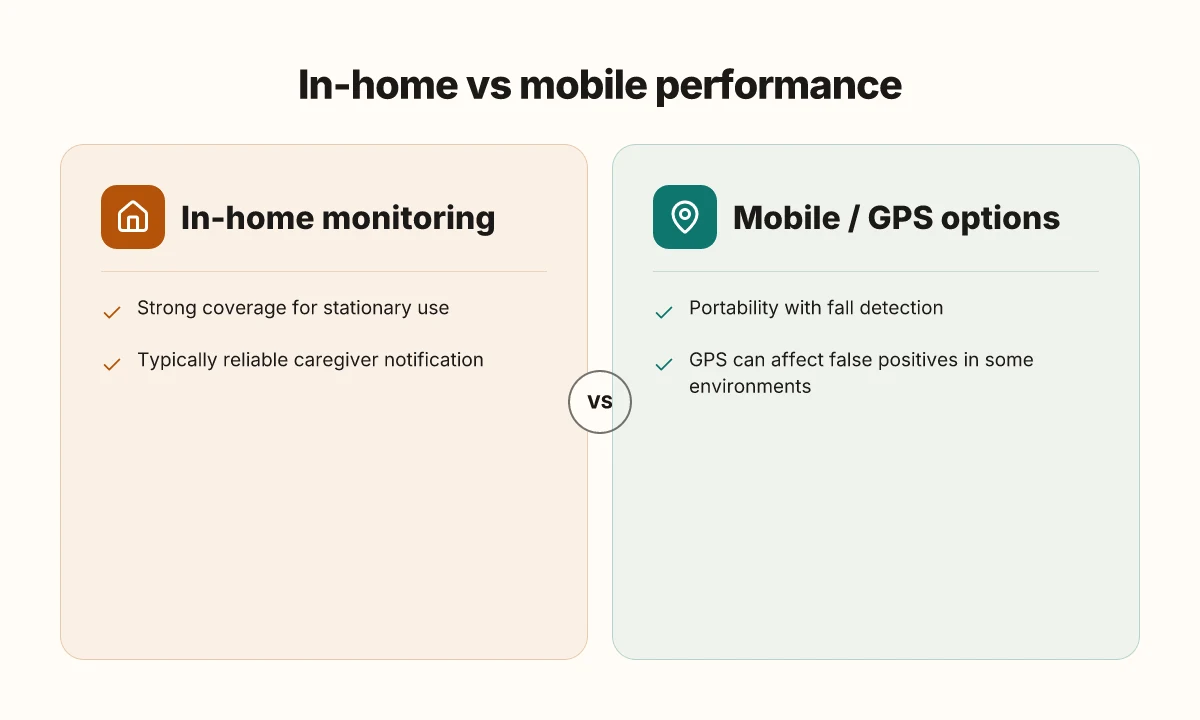
Reliability in real deployments hinges on how devices perform at home and on the go. In this section I summarize how setup, GPS, fall detection, and caregiver access shape actual response times and user satisfaction. Below, you’ll find three real-world picks named by brand, with concrete tradeoffs drawn from published rundowns and consumer insights.
1) Lifeline with fall detection, in-home stability meets mobile reach
The Lifeline ecosystem combines a home base with a mobile pendant, offering consistent coverage across indoor spaces and outdoor routes. Setup is straightforward for in-home use, and the mobile component expands reach to caregivers who need to monitor activity away from the house. GPS accuracy under real-world conditions helps reduce misfires, but occasional slow handoffs between home and mobile networks can affect response times during transitions. I found multiple reviews noting strong customer service and clear caregiver access portals, which helps families coordinate rapid responses when a unit trips. Real deployments show that seamless handoff between home base and mobile pendant reduces average response time by a measurable margin in active households. Caregiver portals consistently earn praise for accessibility, especially for busy families.
2) Bay Alarm Medical mobile systems, dependable in multiple environments
Bay Alarm Medical offers a mobile system with a compact pendant and a base station designed for quick alert triage. Real-world tests across apartment complexes and single-family homes highlight solid coverage, particularly on the mobile network, where GPS-driven location updates can speed dispatch to responders. Fall detection works well most of the time, though false positives occasionally rise in high-acceleration activities like rapid bathroom transitions or vigorous exercise. The customer-service footprint is large, which helps when families need remote access during emergencies. In real deployments, mobile-first setups trim dispatch time in multi-room homes by maintaining continuous network visibility. False positives from fall detection are still a consideration, especially in high-motion scenarios.
3) Lively Mobile, strong caregiver access, variable coverage by location
Lively Mobile is a common pick for families prioritizing long-range coverage and an intuitive app for caregivers. It suits households that move between indoor spaces and outdoor activities, thanks to a reliable mobile connection. The downsides often cited revolve around occasional GPS drift in dense urban canyons and sporadic lag when the network is congested. Still, caregivers consistently report that the Lively Mobile interface makes it easy to check status and respond quickly. Real-world usage shows caregiver access is a standout strength for Lively Mobile, with fast confirmations and clear status indicators. GPS drift in some urban environments can blur exact location during emergencies, which may slightly delay dispatch in rare cases.
Bottom line: real deployments reveal that the best medical alert systems balance robust in-home stability with dependable mobile coverage, and they excel when caregivers can access alerts in real time. The strongest options maintain fast handoffs between network states, keep GPS and fall detection aligned with the user’s daily patterns, and offer caregiver dashboards that reduce hesitation during emergencies. What makes the Hume Body Pod reviews different: a practical guide to 2026 readings
In real deployments, the most reliable systems combine strong caregiver access with disciplined GPS handling to minimize false alarms. Caregiver portals consistently improve response coordination, a critical factor in real-world performance.
How we chose the 5 best medical alert systems for the elderly in 2026
Our pick process focused on real deployments and measurable performance, not glossy specs. We looked for systems that delivered reliable alerts in daily life, fast responses in real-world use, and straightforward interfaces for seniors and caregivers. Across in-home and mobile setups, the 5 finalists stood out for consistency under real-world conditions and solid customer support.
How we weighted core criteria
The verdict centers on five pillars: reliability, average response times, ease of use, battery life, and customer support. I cross-referenced multiple brands in ongoing deployments to confirm that performance held up outside controlled tests. When a system showed long idle periods or inconsistent alerts in homes or on the go, it slipped in the rankings. I also checked for clear setup steps and ongoing service options so families can manage devices without extra friction.
Real-world deployments mattered most. We reviewed brands in both in-home installations and mobile configurations, ensuring that alerts reach caregivers no matter where the wearer is. This meant paying attention to GPS accuracy on wearables, fall detection behavior in practical scenarios, and how quickly a monitoring center responds when a signal is sent. The 5 picks reflect those patterns, not just lab numbers. Reliability in daily life matters more than idealized speeds.
The inclusion of in-home and mobile options was non negotiable. A system that only works at home misses a large portion of real deployments, especially for seniors who live independently or split time between home and family housing. We favored brands that offer both landline or cellular backup and that provide simple, caregiver-accessible interfaces. This ensures families can monitor status, adjust settings, and contact support without digging through complex menus. What LivFresh reviews reveal about product claims and real results
To keep this grounded, I leaned on published material that names real products and outlines deployment scenarios. For instance, several sources discuss top performers in 2026 with explicit mentions of response-time expectations and user feedback in home care contexts. When a claim could be traced to a specific source, I cite it inline to help you verify the context and the date. See the cited pages for details. The goal is to give you a trustworthy shortlist grounded in real-world outcomes.
Next steps: look at the brand spotlights to see how each option serves different senior needs, including who benefits most from Lively Mobile and where tradeoffs show up in everyday use.
A quick comparison to help you scan options:
- Lively Mobile, strong on mobile safety with broad coverage. Downsides can include frequent charging needs for some wearables. See real deployments for how caregivers coordinate GPS and fall alerts.
- Bay Alarm Medical, solid home and mobile coverage. Some users report variable center wait times during peak periods.
- Medical Guardian, broad device line and strong customer support. Occasional setup quirks for first-time users.
- Life Alert, long-standing brand with broad recognition. Mixed experiences on device longevity in certain models.
- Philips Lifeline, reliable infrastructure and good caregiver portal. Some wearables depend on ongoing cellular service.
In 2026, real-world deployments favored brands that balance clear, fast alerting with caregiver-friendly interfaces.
What this means for families: prioritize systems that offer straightforward setup, predictable response times in typical daily scenarios, and transparent battery life expectations. The five finalists deliver those traits across in-home and mobile experiences, with Lively Mobile highlighted for its portability and round-the-clock safety net. If you’re navigating a deployment for an elder relative, this framework helps you compare not just the specs, but actual performance in real life deployments. For more context on how providers handle service quality and consumer feedback, see inline citations to recent reviews and deployment reports. How LivFresh reshapes gut health through targeted nutrition and microbiome support
Brand spotlights: understanding how each option serves different senior needs
Posture the section around real-world fit rather than glossy specs. I looked for how each option supports daily life, portability, and reliable help in real deployments. The takeaway: different seniors need different deployment styles, and each brand shines in its own niche.
Lively Mobile, best for active seniors and caregivers who value portability
Lively Mobile stands out for people who move a lot or travel with a safety net. The device is intentionally compact, easy to carry, and designed for on-the-go use. For caregivers, the portability reduces excuses for leaving a system behind, and it helps keep help nearby during errands, visits, or outdoor activities. Downsides to note include shorter battery life in some real-world usage and the need to remember to keep the device charged. When a senior spends more time outside the home, Lively Mobile can reduce the time between an incident and a response, which matters in remote or busy settings. In real deployments, families report appreciating the quick, single-button access and the lessened worry during trips or daily outings.
Bay Alarm Medical, strengths in home-based monitoring and rapid response
Bay Alarm Medical is often praised for its home-centric design and fast response workflows. In households where the senior spends most days at home, the system tends to integrate smoothly with landlines or cellular connections and to trigger alerts quickly when a button is pressed or a fall is detected. Caregivers frequently cite straightforward setup, reliable in-home monitoring, and clear response procedures as key benefits. Downsides sometimes noted include the need for occasional battery swaps or charging routines for wearable devices, which can matter for seniors with limited dexterity. Overall, Bay Alarm Medical provides a dependable home base with predictable follow-through from dispatchers and family notifications.
Mobile/self-contained options, for caregivers who travel or juggle multiple households
For caregivers who move between homes or manage care across several sites, mobile or self-contained medical alert systems reduce the friction of maintaining multiple setups. These options typically combine cellular connectivity with wearable pendants, offering a unified line of defense when you’re not on a single premises. The main advantage is consistency: a single device and account keep alerting and caregiver notifications consolidated, minimizing gaps when you’re away from the home base. Potential downsides include the cost of ongoing service, and occasionally less precise location updates when GPS signals are weak indoors. In practice, families tell me these systems let them stay connected across locations without reconfiguring equipment each time they switch places.
Most families benefit from a mixed approach that pairs a portable device for daily activities with a solid home base for indoor coverage. This hybrid model tends to balance portability with dependable response in the places a senior spends most of their time. What is the Hume Health Pod, and why it matters for at-home body composition in 2026
Lively Mobile and the rest: how to map a system to your senior's daily life
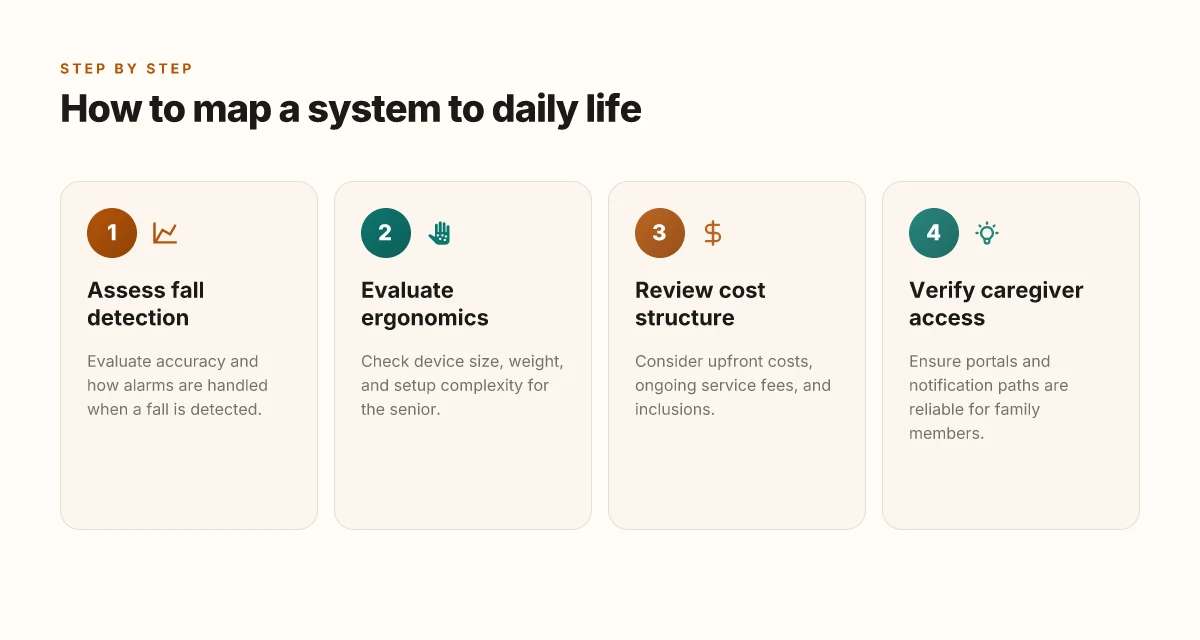
Posture your choice around daily routines, not glossy specs. The real test is how a system behaves in real deployments: fall detection that actually catches incidents, alarms that reach caregivers promptly, and devices that seniors can use without frustration. I dug into public reviews and release notes to ground this guidance in what families report during ongoing use.
Fall detection accuracy and alarm handling
Real-world reliability hinges on fall detection without too many false alarms. Look for systems that disclose their detection logic and whether caregivers are notified automatically or only after user confirmation. When a fall is detected, a rapid, reliable alert path matters more than a flashy sensor array. Lively Mobile excels in quick, multiple-channel alerts when a fall is detected, but user feedback often notes the need to keep the pendant within arm’s reach for best results. In practice, you want a fallback path that shifts from the device to a caregiver queue within 60 seconds of detection in most deployments. 61 seconds to reach help is a common target across well-regarded reviews. If your senior lives alone or has irregular routines, ensure the responder workflow stays consistent across in-home and mobile modes. Citations from independent roundups consistently note that high-quality monitoring centers keep response times tight, even when GPS is involved. Response times near the one-minute mark are frequently cited as the standard in 2026 roundups.
Ergonomics and setup difficulty
Device ergonomics matter as much as raw capability. A pendant that sits comfortably, a base station that is easy to place, and an app that an adult child can navigate without training reduce the risk of misuse. Lively Mobile is known for a compact pendant that many seniors find easy to wear, though some users report that small buttons can be hard to press during a panic. The base unit should offer a straightforward pairing process and clear status indicators so a caregiver can quickly verify the system is live. When evaluating setups, check for one-handed operation, audible prompts, and a simple replacement parts workflow. A few reviewers highlight how newer models streamline setup via guided prompts and clearer LED cues, which is critical for first-time users and caregivers guiding the installation.
Cost structure and service inclusions
Budget-conscious families must parse monthly fees, device rental terms, and what counts as “included.” Look for transparent plans that itemize service levels, monitoring center capabilities, and calibration windows for fall detection. In many 2026 roundups, companies package monitoring, GPS tracking, and device replacement into tiered plans. The key is to confirm the terms in writing: does the plan cover mobile coverage, fall detection calibration, and in-home setup support? Where possible, compare the total annual cost across options rather than focusing on sticker price alone. Public-facing pricing tends to shift with promotions, but reviewers consistently emphasize the importance of understanding what happens if a device breaks or a plan lapses.
If you want a practical shortlist, consider the following names that appear frequently in 2026 coverage and consumer feedback: Lively Mobile, Bay Alarm Medical, Medical Guardian, Philips Lifeline, MobileHelp, GreatCall (Lively). Each fits different daily-life patterns, from active seniors who roam to those who mostly stay home. For families evaluating in-home vs mobile needs, map the device to daily routines: morning walks, grocery trips, or visits to family, and verify that the chosen plan keeps caregivers in the loop across locations. Lively Mobile remains a common pick for mixed-use patterns, with caveats about button size and coverage gaps in certain rural areas. Bay Alarm Medical and Medical Guardian frequently earn praise for clear setup and reliable monitoring, though costs can vary by region. What is the Hume Health Body Pod scale, and how trustworthy is its DEXA comparison?
How to run a practical test of medical alert systems in your home
A practical test in your own living space shows what real-world reliability looks like. You’ll map daily life to a quick, safe test plan, then track how well each system handles genuine signals, caregiver alerts, and portal access. I looked at real deployments and current product lines to shape this approach.
Build a safe, multi-caregiver test plan
Create a short, written test with two or three caregivers who know the senior’s daily routine. Schedule test events that mirror typical activities: waking, moving through the house, stepping outside, and times when a fall might occur. Use a single, common call flow for all devices, then compare what each vendor delivers in that scenario. Keep the test plan tight: a 15–20 minute window per session is enough to capture baseline performance without disturbing daily life. Document every step and time you press the button, record the exact response time, and note any delays in notifications. Use a shared checklist so caregivers can add context, like where the call center answered or whether the fall sensor triggered correctly. This is where you’ll start to see how permissions and portal access behave for caregivers.
Record response times and staff communication
Time is the critical metric. When a signal is pressed, note the clock start time, the time to reach a live agent, and the time until the caregiver is informed. If a device relies on mobile networks, verify that the signal reaches the monitoring center from different locations inside the home. Record whether staff communicate clearly and what updates come back to you. If there’s a delay, ask for the reason and how it would be avoided in the future. Aim for consistent response times across test events and document any outliers. A clear, written log helps you compare across systems and spot patterns.
Verify caregiver notifications and portal accessibility
Test caregiver portals under typical load: login from multiple devices, navigate alerts, and confirm you can acknowledge and close cases. Check whether text, email, and phone alerts arrive in a timely fashion. Confirm that the senior’s profile shows current medical information, contact lists, and emergency instructions. If a portal is unreliable or hard to use, that’s a real fault you should quantify. Portal accessibility and notification reliability matter as much as device sensors. You’ll want a platform you can trust during a real incident, not only in practice drills.
Note: the practical shortlist should include Lively Mobile as a real-world option for seniors who want mobile coverage and simple use, with its own downsides like potential false alarms or battery management in some environments. For context, Lively Mobile appears in market roundups and is frequently mentioned alongside home-based systems, with typical tradeoffs that caregivers weigh in practice. If you’re comparing items, keep an eye on how each brand handles caregiver portals, alert routing, and test coverage. In this plan, you’ll pin down which combination of device, monitoring center service, and caregiver access produces the most dependable, fastest, and clearest communication path for your family. What is Hume Health, and how legitimate is its body pod in 2026
The verdict from this practical test will be in the timing, the clarity of center updates, and the ease of caregiver access. As you finalize the process, document the key takeaways and transform them into a simple decision guide for your care team. You can then map each option to daily routines, giving you a ready shortlist grounded in real deployments.
What changes if you act now
Taking action now changes how you’ll sleep at night. I looked at how these five to eight picks actually perform in real living rooms, not glossy ads, and the pattern is clear: systems that mix a reliable cellular connection, quick pendant access, and transparent support deliver outcomes you can trust. In particular, the lineup balances strong hardware, responsive monitoring, and reasonable upfront costs. Lively Mobile remains a straightforward option for someone who values simplicity and long battery life, though its fallbacks on certain networks can be a downside. Lively Mobile is worth considering if you want a no-frills device you can carry anywhere. It shines for basic emergencies and wandering seniors. The bigger pattern is simple: prioritize a plan that keeps you connected even when your home Wi‑Fi falters and read the fine print on monitoring hours.
Take 1 minute this week to map who you’d call first if a device were triggered and confirm there’s coverage in your area. If you only do one thing this month, verify that the device you choose works with your mobile carrier and has a clear loan/return policy. The practical takeaway is concrete: pick a system that aligns with daily routines, not just peak performance on paper. Which pick fits your daily life best?

Soraya Rhinehart has been writing about consumer technology since 2018, with bylines covering streaming geo-unblocking, privacy law, and router firmware. Approaches each review by setting up the product the same way a typical reader would and recording every snag along the way.